R version 4.4.1 (2024-06-14 ucrt)
Platform: x86_64-w64-mingw32/x64
Running under: Windows 11 x64 (build 22631)

Matrix products: default


locale:
[1] LC_COLLATE=English_United States.utf8
[2] LC_CTYPE=English_United States.utf8
[3] LC_MONETARY=English_United States.utf8
[4] LC_NUMERIC=C
[5] LC_TIME=English_United States.utf8

time zone: America/New_York
tzcode source: internal

attached base packages:
[1] stats     graphics  grDevices datasets  utils     methods   base

loaded via a namespace (and not attached):
 [1] htmlwidgets_1.6.4 compiler_4.4.0    fastmap_1.2.0     cli_3.6.4
 [5] htmltools_0.5.8.1 tools_4.4.0       rstudioapi_0.17.1 yaml_2.3.10
 [9] rmarkdown_2.29    knitr_1.49        jsonlite_1.8.9    xfun_0.49
[13] digest_0.6.37 rlang_1.1.6 renv_1.0.3 evaluate_1.0.1 From Information Overload to Focused Insights: A Traffic Dashboard Redesign
STWD Challenge - Dashboards that Deliver
SWDchallenge
2025
Shiny
A dashboard redesign case study transforming a cluttered multi-tab interface into a focused single-page solution for transport planners. Shows how strategic design choices can dramatically improve user experience and analytical clarity.
The Challenge
This month’s Storytelling with Data challenge focused on “Dashboards that Deliver” - revisiting existing dashboards to make them more focused and user-centric. I chose to redesign my own traffic flow dashboard using the TidyTuesday (2024 wk 49) National Highways Traffic Flow dataset.
The Problem: Information Overload
Original Dashboard - The “Before”
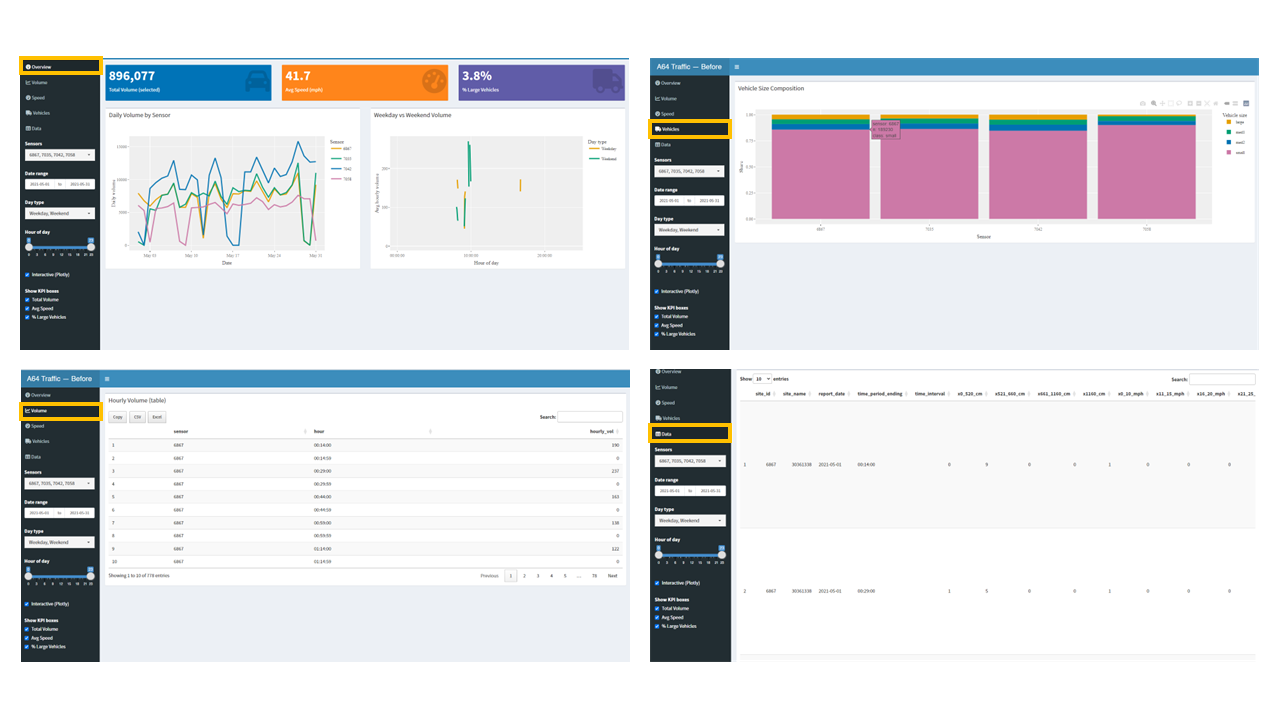
Key Issues Identified:
- Multiple tabs scattered related insights across different views
- Too many controls (sensor picker, date range, day type, hour slider, plotly toggle, KPI toggle)
- Unclear audience - tried to serve everyone, served no one well
- No visual hierarchy - everything competed for attention
- Analysis paralysis - users didn’t know where to start or what questions to ask
The original dashboard suffered from a common problem: attempting to show everything at once rather than guiding users toward the most important insights.
Audience & Analytical Needs
Target Users: Transport Planners & Local Policy Staff
Primary Questions They Need Answered:
- How is daily volume trending this month? (For capacity planning)
-
What’s the weekday vs weekend hourly profile? (For staffing and maintenance scheduling)
- Which sensor shows consistently different patterns? (For identifying problem areas)
Secondary Needs:
- Quick overview metrics at a glance
- Ability to focus on specific date ranges
- Simple comparison between weekday/weekend patterns
- Minimal cognitive load - they’re busy people
The Solution: Focused Clarity
Redesigned Dashboard - The “After”
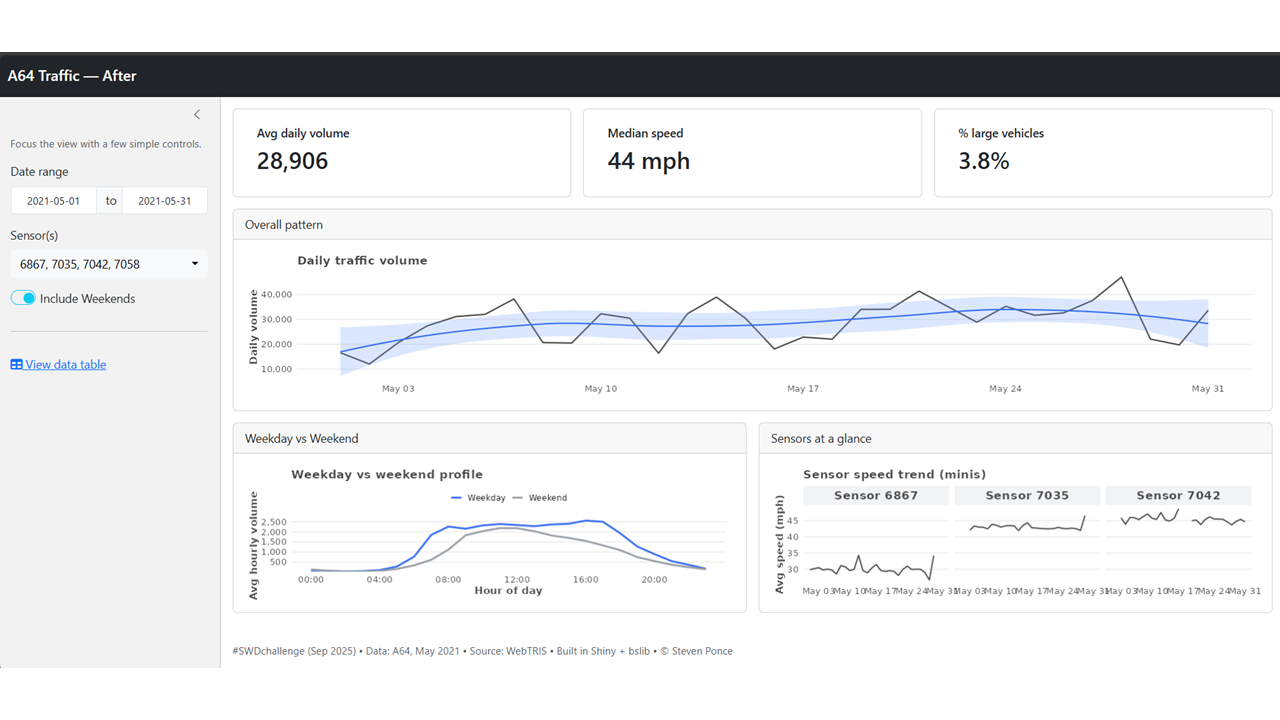
Key Design Decisions
1. Single Page Layout
- Eliminated tabs to keep related insights together
- Created clear visual hierarchy with KPIs at top
2. Streamlined Controls (3 vs 8)
- Date range selector (essential for time-series analysis)
- Sensor selection (allows focus on specific locations)
- Weekday/Weekend toggle (key operational insight)
3. Strategic KPIs
- Avg daily volume: 28,906 (capacity planning)
- Median speed: 44 mph (performance monitoring)
- % large vehicles: 3.8% (infrastructure wear planning)
4. Two Focused Charts - Daily traffic volume with trend line (answers trending question) - Weekday vs Weekend profile (answers operational scheduling question)
Interactive Versions
- Baseline App (Before): https://0l6jpd-steven-ponce.shinyapps.io/01_before_app/
- Makeover App (After): https://0l6jpd-steven-ponce.shinyapps.io/02_after_app/
Navigation: Use the simple sidebar controls to filter by date range, select specific sensors, or toggle between weekday and weekend patterns.
Design Impact & Results
What Changed
- Reduced cognitive load from 8 controls to 3
- Eliminated navigation from 5 tabs to 1 page
- Focused insights from scattered metrics to strategic KPIs
- Clear visual hierarchy guiding users from summary to detail
Questions Now Easily Answered
✅ “How’s traffic trending?” - Immediately visible in main chart with trend line
✅ “When are peak hours?” - Clear hourly profile shows morning/evening peaks
✅ “Weekend vs weekday differences?” - Toggle comparison built into interface
✅ “Which location needs attention?” - Sensor comparison readily available
What Users Gain
- Faster insights - key metrics visible within seconds
- Actionable intelligence - focused on decisions they actually need to make
- Reduced training time - intuitive interface needs minimal explanation
- Mobile-friendly - simplified layout works on smaller screens
Technical Implementation
The redesign was built using R Shiny with the National Highways Traffic Flow dataset from TidyTuesday 2024 Week 49, covering A64 road sensors during May 2021.
Data Source Details
- Source: WebTRIS Traffic Flow API via TidyTuesday (2024 wk 49)
- Coverage: 4 sensors on A64 road, May 2021
- Granularity: Hourly vehicle counts, speeds, and size classifications
- Volume: ~30K daily average across all sensors
Key Technical Choices
- Single reactive dataset instead of multiple data processing streams
- Conditional rendering based on user selections rather than separate tabs
- Optimized calculations focusing on the three key metrics that matter most
- Simplified interactivity - removed unnecessary plotly complexity
Reflection & Lessons Learned
What Worked Well
- Less is more - Removing features improved usability dramatically
- User-centered design - Focusing on specific audience transformed the experience
- Visual hierarchy - Clear information architecture guides user attention effectively
What I’d Do Differently Next Time
- User testing - Would validate assumptions with actual transport planners
- Progressive disclosure - Could add “deep dive” option for power users
- Contextual help - Brief explanations of what “good” looks like for each metric
Key Takeaway
The most powerful dashboards don’t show everything possible - they show everything necessary for specific users to make specific decisions.
Session Info
TipExpand for Session Info
Code Repository
TipExpand for Code Access
- QMD File: swd_2025_09.qmd
- Baseline App: GitHub Repository
- Makeover App: GitHub Repository
- Full Repository: Personal Website Repo
References
TipExpand for References
Challenge Details: - STWD Monthly Challenge
Data Sources: - TidyTuesday 2024 Week 49 - National Highways WebTRIS API